KDP Interiors Weekly Time Sheet Log Book Guide
In the fast-paced world of freelancing, small business management, and academic advising, organization is not just a luxury; it is the backbone of profitability and sanity. For creators selling low-content books on Amazon or professionals seeking a reliable physical tracking system, the KDP Interiors Weekly Time Sheet Log Book represents a critical intersection of utility and design. This isn't merely a blank notebook; it is a structured productivity tool designed to capture the granular details of daily operations that digital apps often miss.
Whether you are a publisher looking for high-quality source files to customize or an end-user needing a tangible method to track billable hours and follow-ups, understanding the specific architecture of this log book is essential. The De-Team 1 edition, in particular, offers a blend of portability and comprehensive data fields that make it a standout choice for diverse professional environments.
Technical Specifications and File Versatility
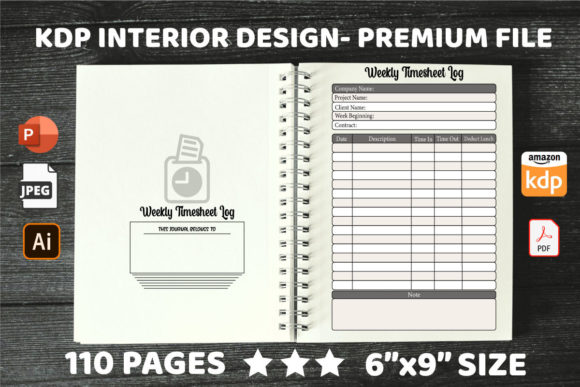
One of the primary concerns for KDP publishers and designers is technical compatibility. A beautiful interior is useless if it gets rejected during upload or prints with margin errors. This specific weekly time sheet log book addresses those pain points through precise engineering. The dimensions are set at a standard 6″ x 9″ inches, which is arguably the most versatile trim size for trade paperbacks. It fits comfortably in a briefcase, backpack, or desk drawer without feeling cumbersome, making it ideal for mobile professionals.
The interior spans 110 pages, providing ample space for several months of tracking without adding excessive bulk to the spine. Crucially, the file is configured with no bleed. For those new to KDP formatting, "no bleed" means all content stays safely within the margins, eliminating the risk of text being trimmed off during the printing process. This safety margin simplifies the publishing workflow significantly.
Perhaps the most valuable feature for entrepreneurs and designers is the inclusion of multiple editable file formats: PDF, AI (Adobe Illustrator), and PPT (PowerPoint). This multi-format approach democratizes customization. If you have professional design software, the AI file allows for vector-level manipulation of columns and headers. However, if you lack advanced design skills, the PowerPoint file enables easy editing using familiar tools. You can adjust column widths, change fonts, or add your own branding logo in minutes before exporting a print-ready PDF. This flexibility ensures the product adapts to your skill level rather than forcing you to learn complex software.
Structured Data Fields for Comprehensive Tracking
A generic lined notebook fails as a time sheet because it lacks prompts. The human brain under stress forgets to record specific data points. This log book solves that cognitive load issue through pre-defined columns that enforce consistency. When evaluating this interior, pay close attention to the specific fields included, as they dictate the book's practical utility:
- Date and Time: Essential for billing accuracy and establishing timelines for project completion.
- Name of Contact and Phone Number: Transforms the log from a simple timer into a relationship management tool, ensuring you never lose a client’s details.
- Subject: Provides immediate context for what was discussed or worked on, preventing vague entries like "meeting" or "call."
- Follow-Up Action Required: This is the productivity engine of the page. It forces the user to define the next step immediately after an interaction.
- Initials: Vital for shared office environments or team-based projects where accountability must be tracked across multiple staff members.
- Completion Checkbox: A psychological trigger that provides satisfaction upon task completion and allows for quick visual scanning of pending items.
This combination of fields makes the KDP Interiors Weekly Time Sheet Log Book function as a hybrid between a timesheet, a call log, and a task manager. It captures the "who, what, when, and what's next" in a single horizontal row.
Real-World Applications Across Industries
The versatility of this layout extends far beyond traditional hourly wage tracking. Because the columns focus on communication and action rather than just clock-in/clock-out times, it serves distinct niches effectively.
For Call Centers and Walk-In Advising Centres:
In high-volume environments, advisors often speak with dozens of people daily. Digital CRMs can be slow or require excessive clicking. A physical log book allows for rapid notation during live conversations. The phone number and follow-up columns ensure that no client query falls through the cracks during shift changes. The initials field is particularly useful here for quality assurance supervisors reviewing agent performance.
For Freelancers and Consultants:
Billable hours are only half the equation; scope creep is the other. By logging the "Subject" and "Follow-Up Action," freelancers create a paper trail that protects them during invoice disputes. If a client claims a task wasn't discussed, the dated entry with specific subject matter serves as contemporaneous evidence. Furthermore, having a physical backup to digital invoicing software provides peace of mind against technical failures.
For Students and Academics:
Graduate students and researchers often struggle to manage advisor meetings and thesis milestones. Using this log book helps structure unstructured time. Recording meeting dates, advisor feedback (subject), and required revisions (follow-up) creates a clear roadmap toward degree completion. It teaches professional documentation habits that translate directly to post-grad employment.
For Busy Offices and Administrative Staff:
Receptionists and office managers act as the central nervous system of a business. They field calls, schedule appointments, and handle vendor inquiries simultaneously. This log book acts as an external hard drive for their memory. The checkbox feature allows them to glance at the open book and instantly see what remains unresolved before leaving for the day.
Why Physical Logging Still Matters in a Digital Age
You might wonder why anyone would choose a paper log book when Trello, Asana, and Excel exist. The answer lies in cognitive friction and accessibility. Opening an app requires unlocking a device, navigating menus, and resisting the distraction of notifications. Writing in a log book is instantaneous and singularly focused. There is no boot-up time and no battery life to worry about.
Furthermore, the act of handwriting has been shown to improve information retention. When a professional writes down a follow-up action, they are more likely to remember it than if they had typed it. For KDP sellers, marketing this benefit is key. You aren't selling paper; you are selling focus, reliability, and a break from screen fatigue.
Implementation Tips for Publishers and Users
If you are utilizing the editable PPT or AI files to create your own version of this product, consider your target audience's specific needs. While the standard columns cover 90% of use cases, niche markets may require slight adjustments. For example, a medical office might need a "Patient ID" column instead of "Name of Contact," while a construction site manager might need a "Location" field. The ease of editing provided by De-Team 1 allows you to pivot quickly to serve these micro-niches.
For end-users adopting this system, consistency is paramount. Treat the log book as a living document. Review the "Follow-Up Action Required" column at the start and end of every day. Migrate unfinished tasks to the next available line or transfer them to your digital calendar. The checkbox is not just for show; use it ruthlessly to maintain momentum.
Ultimately, the KDP Interiors Weekly Time Sheet Log Book succeeds because it respects the complexity of modern work while maintaining a simple interface. Whether used as a standalone productivity system or a complement to digital tools, its structured approach brings order to chaos. For publishers, the robust file formats and safe formatting ensure a smooth path to market. For users, the thoughtful column design transforms daily administrative drudgery into a streamlined workflow. In an era of endless digital noise, sometimes the most advanced technology is a well-designed piece of paper.