Creating a Professional 2022 Monthly Goals Planner with KDP Interiors
The low-content publishing market has evolved significantly, moving beyond simple lined journals to highly functional, niche-specific tools. For creators looking to capitalize on the productivity and self-improvement sector, having a reliable foundation is essential. This is where specialized assets like the Move TV Show List - KDP Interior s collection becomes relevant. While the name suggests entertainment tracking, this suite of interiors encompasses versatile organizational tools, including the comprehensive 2022 Monthly Goals Planner. Understanding how to leverage these pre-formatted, editable files can drastically reduce production time while ensuring a professional finish that meets Amazon KDP’s strict printing standards.
The Strategic Value of Pre-Formatted KDP Interiors
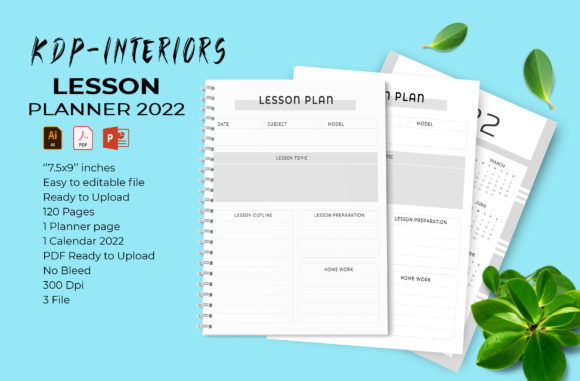
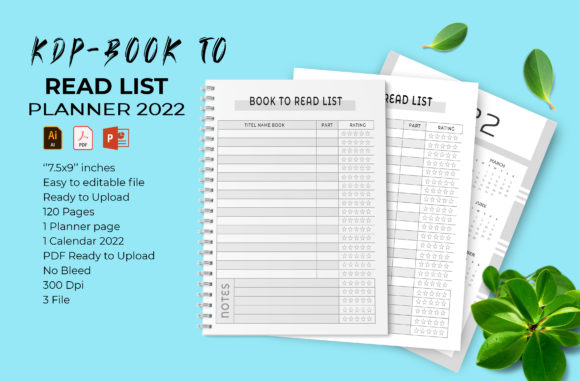
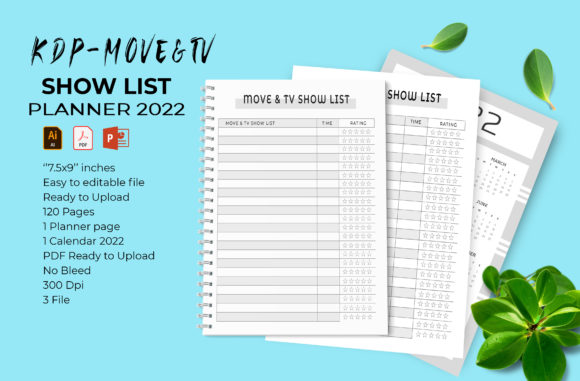
One of the most common pitfalls for new and experienced publishers alike is formatting errors. Margins that are too narrow, bleed settings that trigger rejection emails, or resolution issues that result in blurry text can stall a launch for weeks. The 2022 Monthly Goals Planner included in this package addresses these technical hurdles head-on. It arrives as a print-ready file sized at 7.5 x 9 inches with no bleed, which is a preferred trim size for planners that need to be portable yet spacious enough for detailed writing.
By utilizing tested interiors, publishers shift their focus from technical troubleshooting to marketing and keyword research. The file includes a ready-to-upload PDF, but the true value lies in the source files. Whether you prefer Adobe Illustrator CC 2019 (AI/EPS) or Microsoft PowerPoint 2016, the templates are fully accessible. This flexibility allows creators to modify colors, adjust layouts, or rebrand the planner entirely without needing advanced graphic design skills. The inclusion of 100 resizable vector shapes means you can add custom branding elements, icons, or decorative borders that scale perfectly without losing quality at 300 DPI.
Anatomy of an Effective Goals Planner
A successful goals planner must balance structure with freedom. Users in 2022 were looking for more than just blank calendar grids; they wanted guided intention setting. This 120-page interior is structured to support that journey. It begins with a dedicated cover page and a full 2022 calendar spread, providing immediate context for the year ahead. However, the core utility lies in the monthly breakdowns.
When designing or customizing this planner using the provided PPT or AI files, consider the user experience. The "no bleed" specification is crucial here. It ensures that all content stays safely within the printable area, eliminating the risk of text being trimmed off during the binding process. For a goals planner, this safety margin provides a clean, uncluttered aesthetic that users appreciate when they are trying to focus on complex life objectives. The 120-page count is also strategically chosen; it is substantial enough to feel like a premium product but light enough to keep printing costs manageable, allowing for competitive pricing on the KDP marketplace.
Customization Workflow for Unique Branding
While the Move TV Show List - KDP Interior s package provides a robust starting point, differentiation is key in a saturated market. The fully editable vector nature of this template invites customization. Here is a practical approach to making this planner your own:
- Color Psychology: Use the easy color-change feature to align the planner with your brand identity. Soft blues and greens often denote calm and growth, while bold oranges or reds can signify energy and action. Since the vectors are separated, changing the accent color across all 120 pages takes only moments.
- Niche Adaptation: Although this is a general goals planner, the editable text fields allow you to pivot. You could rename sections to create a "Fitness Goals Planner," "Business Revenue Tracker," or even integrate elements from the Move TV Show List concept to create a "Content Creator’s Watch & Plan Journal."
- Vector Integration: Utilize the 100 included vector shapes to create visual hierarchy. Use them as bullet points, section dividers, or background watermarks. Because they are vectors, they remain crisp whether printed on standard white paper or premium color options.
Technical Specifications and Print Readiness
Understanding the technical deliverables is non-negotiable for KDP success. This specific interior package is engineered for compliance. The 7.5 x 9 inch dimension with no bleed is a standard that balances usability with manufacturing constraints. When uploading to KDP, selecting "No Bleed" in the dashboard is mandatory for this file. Attempting to force a bleed setting on a no-bleed file will result in scaling errors or white borders appearing unintentionally.
The resolution is locked at 300 DPI, which is the industry standard for high-quality print. Low-resolution interiors often look pixelated on physical paper, leading to negative reviews and returns. By starting with a high-fidelity source file, you guarantee that every line, checkbox, and header appears sharp. The inclusion of both AI and PPT formats ensures longevity; even if you do not currently own Adobe Creative Cloud, the PowerPoint file serves as a universally accessible alternative that retains the layout integrity.
Integrating Diverse Content Types
The mention of Move TV Show List - KDP Interior s alongside a goals planner highlights an important trend in modern publishing: hybrid functionality. Modern consumers rarely live in silos. They track their fitness goals while also tracking their entertainment habits. Smart publishers recognize this overlap.
You might consider using the editable framework to add a "Leisure & Inspiration" tracker within the monthly goals sections. Entertainment, such as curated TV show lists, can actually serve as a reward mechanism within a goal-setting system. By having access to a suite of interiors that covers both productivity and lifestyle tracking, you can create unique value propositions. Perhaps the monthly reflection page includes a prompt about what media inspired the user that month. This cross-pollination of content types makes the planner feel more human and less mechanical, increasing its perceived value to potential buyers.
Practical Considerations for Home and Office Printing
Not every user intends to sell exclusively on Amazon. The versatility of this 120-page template extends to home, office, and local print shop use. For those creating internal corporate planners or personal development workbooks for coaching clients, the PDF file offers immediate utility. The 7.5 x 9 size prints beautifully on standard letter-sized paper (with trimming) or can be sent to a professional bindery for coil or perfect binding.
For home printing, the no-bleed design is particularly forgiving. Home printers often have inconsistent margins, and a no-bleed layout with adequate safe zones prevents critical content from being cut off. Coaches and consultants can use the editable PowerPoint file to insert their logo and specific methodology before printing batches for workshops. This turns a generic digital asset into a bespoke branded tool without the overhead of hiring a designer or waiting for bulk offset printing minimums.
Maximizing the Editable Vector Assets
The 100 resizable vector shapes included in this package are more than just decoration; they are functional design elements. In goal planning, visual cues help users navigate the book quickly. Consider using specific shapes to denote different types of goals—perhaps a star for milestones, a circle for habits, and a square for tasks. Creating a consistent visual language throughout the 120 pages enhances usability.
Furthermore, these vectors allow for seasonal updates. If you plan to release a refreshed version of the planner annually, you can swap out graphical elements to reflect new themes without rebuilding the layout from scratch. This efficiency is vital for maintaining a sustainable publishing business. The ability to easily change colors and resize elements means that the Move TV Show List - KDP Interior s investment pays dividends across multiple projects and years, not just for the 2022 edition.
Ensuring Quality Control Before Upload
Even with a print-ready file, best practices dictate a thorough review process. Before uploading the PDF to KDP or sending it to a print shop, always download the proof copy or use the online previewer extensively. Check the alignment of the calendar grid against the safe zone lines. Verify that the editable text fields in the PPT or AI file haven't shifted during export. Test print a few pages at actual size on your home printer to gauge the writing space and line weight. This extra step of validation ensures that the final product matches the professional promise of the template.
Ultimately, the effectiveness of a KDP interior lies in how well it serves the end-user's intent. A 2022 Monthly Goals Planner needs to be inviting, clear, and structurally sound. By leveraging high-quality, editable resources, publishers can deliver exactly that while maintaining the agility to adapt to market trends. Whether used for a commercial KDP launch or a private organizational tool, these formatted interiors provide the professional backbone necessary for success in the competitive world of print planning.