Assignment Planner - KDP Interiors Vol-2: Streamlining Student Organization and Publishing
Creating a successful low-content book on Amazon KDP requires more than just uploading a generic template; it demands a product that solves a specific problem for a targeted audience. For publishers focusing on the education niche, the Assignment Planner - KDP Interiors Vol-2 serves as a comprehensive foundation for building high-quality student organization tools. This resource is designed specifically for self-publishers who want to bypass the tedious layout phase and move directly to customization and publishing. By providing a professionally structured interior, this template addresses the growing demand for academic planning tools while offering the technical flexibility needed to create a unique brand identity in a competitive marketplace.
Addressing Common Challenges in KDP Interior Design
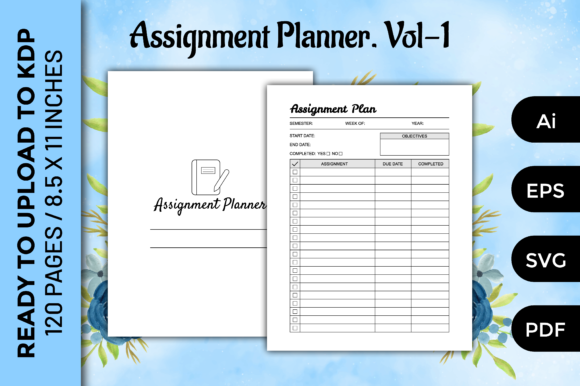
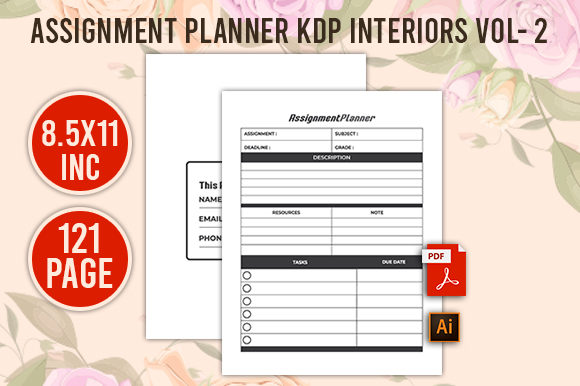
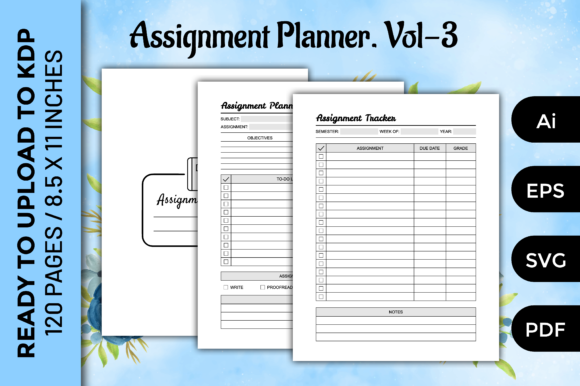
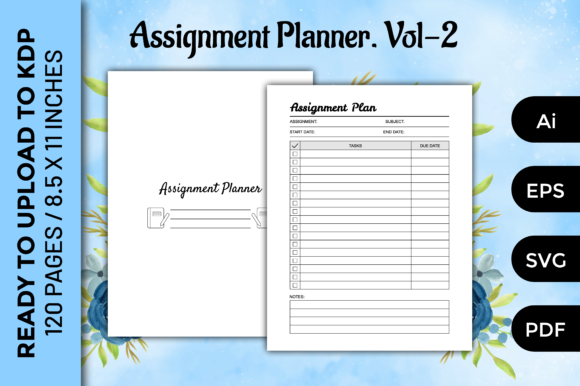
Self-publishers often face significant hurdles when creating functional planners. The most prevalent challenge is ensuring technical compliance with KDP’s printing standards. Margins, bleed settings, and resolution requirements can be confusing, leading to rejected manuscripts or poor print quality. The Assignment Planner - KDP Interiors Vol-2 eliminates this guesswork by providing files that are pre-formatted to exact specifications. With a standard 8.5×11 inch size and 120 pages of no-bleed content, the interior is optimized for immediate upload or home printing without requiring extensive technical adjustments.
Beyond technical compliance, creators struggle with designing layouts that are actually useful to students. A planner that looks beautiful but lacks functional space for tracking deadlines, subject notes, or project milestones will result in negative reviews. This volume focuses on utility, offering a structure that balances writing space with organizational prompts. Instead of spending weeks researching what makes an effective assignment tracker, publishers can leverage a proven layout that has been designed with student workflows in mind. This shifts the creator's focus from basic drafting to value-added customization and marketing.
Technical Specifications and File Versatility
The true value of this template lies in its multi-format delivery system. While many KDP resources only offer flattened PDFs, the Assignment Planner - KDP Interiors Vol-2 includes editable source files that empower creators to modify every aspect of the design. Understanding these file types is essential for maximizing the template's potential:
- Print-Ready PDF: This file is set at 300 DPI, ensuring crisp text and lines when printed. It is formatted with correct margins for KDP’s 8.5×11 trim size, making it suitable for immediate upload or local printing for personal use.
- Adobe Illustrator (.ai) Files: These vector-based source files allow for complete customization. Publishers can change fonts, adjust column widths, add branding elements, or modify headers to target specific demographics, such as nursing students, law students, or high schoolers.
- EPS 10 and SVG Formats: These scalable vector formats ensure compatibility across different design software platforms. Whether you use Affinity Designer, CorelDRAW, or older versions of Illustrator, these files maintain perfect quality at any scale, allowing for seamless integration into other projects or marketing materials.
This versatility ensures that the template is not a static product but a dynamic asset that can evolve with your publishing business. The ability to edit in Illustrator means you can create an entire series of assignment planners from a single master file, significantly increasing your return on investment.
Practical Applications for Diverse User Groups
The Students Assignment Planner for KDP is adaptable to various niches within the education sector. Different users approach academic planning with distinct needs, and this template supports those variations through customization.
For KDP Publishers and Entrepreneurs
Publishers can use this template as a base for seasonal products. For example, editing the cover and interior headers to reflect "Back to School 2024" or "Spring Semester" creates timely relevance. Because the files are editable, entrepreneurs can also bundle this planner with other study aids, such as grade trackers or password logs, to create premium composite journals. The no-bleed format simplifies the cover design process, reducing errors during the proofing stage and accelerating time-to-market.
For Educators and Tutors
Tutors and homeschool educators often need customized planning tools that commercial publishers do not provide. Using the editable AI or EPS files, an educator can insert their own logo, specific curriculum milestones, or institutional branding. This transforms a generic planner into a proprietary teaching aid. For instance, a music tutor could modify the assignment sections to include practice logs and repertoire lists, creating a specialized tool for their students that reinforces lesson objectives outside the classroom.
For Students and Parents
Even those not interested in publishing can benefit from this resource as a printable solution. The included PDF allows parents to print assignment planners at home for immediate use. This is particularly valuable for students who prefer physical writing over digital apps or for families managing multiple children’s schedules. The 120-page count provides ample space for a full semester of tracking, and the 8.5×11 size offers generous room for detailed notes and complex project breakdowns.
Strategic Customization for Market Success
To stand out in the KDP marketplace, simply using the template as-is is rarely sufficient. Successful publishers treat the Assignment Planner - KDP Interiors Vol-2 as a starting point rather than a final destination. Consider implementing the following strategies to enhance the product's value:
- Niche-Specific Terminology: Rename generic sections to match your target audience. Change "Subject" to "Clinical Rotation" for nursing students or "Case File" for law students. This semantic alignment signals relevance to buyers browsing search results.
- Add Value Pages: Utilize the editable files to insert supplementary content. Adding reference tables, conversion charts, or motivational quotes can differentiate your planner from competitors using similar base templates.
- Test Print Before Publishing: Although the files are 300 DPI and pre-formatted, always order a physical proof or print a test copy at home. Paper thickness and binding can affect how usable the planner feels. Ensuring the gutter margin provides enough writing space near the spine is critical for user satisfaction.
- Leverage Vector Graphics: Use the included SVG and EPS assets to create matching bookmarks, stickers, or digital downloads. These add-ons can be used as lead magnets to build an email list or as upsells to increase average order value.
Ensuring Quality and Usability
The effectiveness of any assignment planner depends on its usability. When customizing the Students Assignment Planner for KDP, prioritize whitespace and readability. Overcrowding pages with too many tracking fields can overwhelm users and reduce adoption. The provided template strikes a balance, but if you modify the layout, ensure that font sizes remain legible (typically 10pt or higher for body text) and that lines are thick enough to print clearly on standard KDP paper stock.
Furthermore, consider the user experience regarding the no-bleed specification. Since the content does not extend to the edge of the page, all critical writing areas must stay well within the safe zone. This design choice actually benefits students, as it prevents text from being cut off during trimming and ensures that hole-punching for binders will not damage the content. When marketing your finished product, highlight this feature as a benefit for durability and archival quality.
Moving From Template to Finished Product
The transition from downloading the Assignment Planner - KDP Interiors Vol-2 to holding a published book should be streamlined. Start by organizing your downloaded assets into clear folders separating the print-ready PDFs from the editable source files. Open the AI or EPS files in your preferred vector editor to make necessary customizations before exporting a new high-resolution PDF. Always verify that your export settings maintain the 300 DPI standard and embed all fonts to prevent substitution issues during printing.
By utilizing this comprehensive template package, creators can significantly reduce production time while maintaining professional quality standards. Whether you are building a publishing portfolio, creating educational resources for a tutoring business, or simply organizing your own academic life, this planner provides the structural integrity and creative freedom necessary for success. The combination of technical precision and editable versatility makes it an essential asset for anyone serious about producing functional, high-quality academic stationery.